
Creating pre-defined Add to Cart quantity selectors in WooCommerce can streamline the shopping experience by allowing customers to quickly select and add predefined quantities of a product to their cart with a single click. This approach can be particularly useful for bulk purchases, promotional bundles, or simply to enhance usability. In this guide, we’ll show you how to implement pre-defined quantity selectors that replace the standard “Add to Cart” button on your WooCommerce product pages.
Before modifying your theme’s files, it’s prudent to create a child theme to safeguard your changes. Our free WordPress child theme generator is a great resource to get this done quickly and efficiently.
Step 1: Removing the Default Add to Cart Button
First, we need to remove the default Add to Cart button and quantity input from the product pages. This can be done by adding the following code to your theme’s functions.php file:
/*
 * Snippet: WooCommerce: Pre-defined Add to Cart Quantity Selectors – 2026
 * Author: John Cook
 * URL: https://wcsuccessacademy.com/?p=1469
 * Tested with WooCommerce 10.7.0
 * "Remove default add to cart button and quantity input from product pages"
*/
function wcsuccess_remove_add_to_cart_buttons() {
    remove_action('woocommerce_after_shop_loop_item', 'woocommerce_template_loop_add_to_cart', 10);
    remove_action('woocommerce_single_product_summary', 'woocommerce_template_single_add_to_cart', 30);
}
add_action('init', 'wcsuccess_remove_add_to_cart_buttons');
This code effectively removes the Add to Cart button from all product types (single and loop listings) on your WooCommerce site.
Step 2: Adding Pre-defined Quantity Selectors
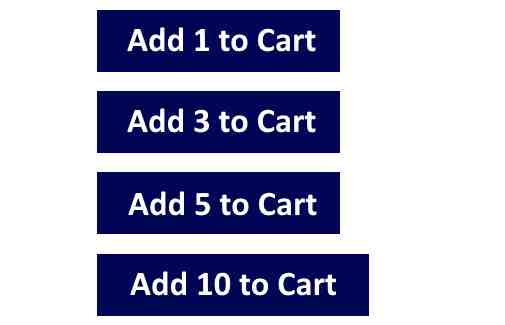
Next, we’ll add our custom pre-defined quantity selectors. These will be styled buttons that link to the product page with a query string that includes the product’s add-to-cart ID and the selected quantity. Insert the following code into the functions.php:
/*
 * Snippet: WooCommerce: Pre-defined Add to Cart Quantity Selectors – 2026
 * Author: John Cook
 * URL: https://wcsuccessacademy.com/?p=1469
 * Tested with WooCommerce 10.7.0
 * "Add pre defined quantity selectors that replace standard add to cart button"
*/
function wcsuccess_predefined_add_to_cart_buttons() {
    global $product;

    // Define your predefined quantities
    $quantities = [1, 3, 5, 10]; // Example quantities

    echo '<div class="wc-success-predefined-quantities">';
    foreach ($quantities as $quantity) {
        // Create a link for each predefined quantity
        $url = add_query_arg(array('add-to-cart' => $product->get_id(), 'quantity' => $quantity), get_permalink($product->get_id()));
        echo sprintf('<a href="%s" class="button predefined-qty" data-quantity="%d">Add %d to Cart</a>', esc_url($url), $quantity, $quantity);
    }
    echo '</div>';
}
add_action('woocommerce_single_product_summary', 'wcsuccess_predefined_add_to_cart_buttons', 30);
This function creates a series of links/buttons. Each button, when clicked, will reload the product page with the specified quantity added to the cart using WooCommerce’s own cart management system.
Step 3: Styling the Quantity Selector Buttons
To ensure that the new buttons match your site’s design and are appealing to users, add the following CSS to your theme’s style.css file or via the WordPress Customizer:
.wc-success-predefined-quantities .button {
    display: inline-block;
    margin: 5px;
    padding: 10px 20px;
    color: #fff;
    background-color: #333;
    text-decoration: none;
    font-size: 16px;
    border-radius: 5px;
}

.wc-success-predefined-quantities .button:hover {
    background-color: #555;
}
This CSS styles the buttons with a basic design, which you can customize to fit your theme.
Conclusion
By following these steps, you’ve now replaced the standard WooCommerce Add to Cart button with pre-defined quantity selectors, enhancing the usability and efficiency of the shopping process. This setup not only makes it easier for customers to make bulk purchases but also can help in managing inventory for promotional items.
If you’re new to coding or theme customization, remember to use a child theme. Our free WordPress child theme generator can help protect your modifications during theme updates. Implementing these changes will make your WooCommerce store more user-friendly and tailored to your specific sales strategies.

I have been working with WordPress and WooCommerce since 2012 and have developed a deep knowledge of the content management system. Since 2012, I have developed several plugins and designed dozens of websites utilising different frameworks, CMS’s and programming languages. I am proficient in PHP, Python, Java, C, C++, R and JavaScript with limited experience in Go, Kotlin and Swift.
Educationally, I have a Master’s degree in cyber security a Bachelor’s (Hons, First Class) in Applied Research and a Graduate Certificate in Data Science. I’m currently undertaking PhD studies investigating IoT cybersecurity. I recently graduated with First Class Honours and Masters of Information Technology, receiving the Executive Dean’s Award for studies undertaken in the 2021 and 2022 academic years. I have worked in the information technology industry for the past 11 years primarily as a software/web developer specific to design, optimisation, network management and security. My research interests are in the areas of Internet of Things (IoT), 5G and Beyond Networks, information security for wireless networks and software development.
Stay In Touch
