
Spam orders in WooCommerce can be a frustrating issue for online store owners. These fake orders clutter your store, waste time, and can even cost you money in processing fees. While there are plenty of plugins that help combat spam orders, it’s possible to stop many of them by using simple techniques without adding unnecessary bloat to your website.
In this guide, we’ll explore how to block spam orders in WooCommerce without relying on a plugin. From adjusting settings to blocking bots, these solutions can significantly reduce the number of spam orders and improve your store’s overall efficiency. As always, if you’re making custom changes, remember to implement them in a child theme to protect your site from updates.
Why Do Spam Orders Happen?
Spam orders can come from:
- Automated Bots: Bots that crawl the web and fill out forms automatically, often generating fake orders in the process.
- Human Spammers: In some cases, real people create fake accounts or orders for malicious purposes.
- Security Gaps: Without proper security measures, spam can easily slip through WooCommerce’s default protections.
Simple Steps to Stop Spam Orders Without a Plugin
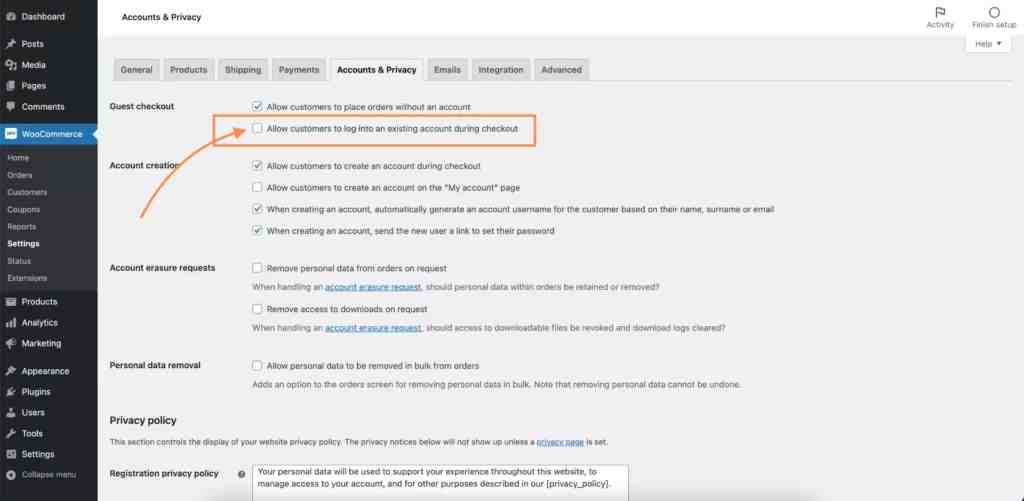
Step 1: Disable Guest Checkout
One of the simplest ways to prevent spam orders is to disable guest checkout. This forces users to create an account, making it harder for bots or spammers to place fake orders.
To disable guest checkout:
- Go to WooCommerce > Settings > Accounts & Privacy.
- Uncheck Allow customers to place orders without an account.
- Save changes.
By requiring accounts, you can reduce the likelihood of bots generating fake orders as they often rely on quick, anonymous form submissions.
Step 2: Block Bad Bots
Blocking bad bots at the server level is one of the most effective ways to prevent spam orders. You can do this by adding rules to your .htaccess file, or by generating a customised .htaccess file using our Ultimate Free WordPress .htaccess File Generator. This method stops bots before they even reach your WooCommerce checkout. Our .htaccess file generator contains an option to block most known bad bots, hosts and IP addresses.
Here’s an example of an .htaccess rule that blocks known spam bots:
# Block bad bots
<IfModule mod_rewrite.c>
RewriteEngine On
RewriteCond %{HTTP_USER_AGENT} ^.*(BadBot|EvilBot|FakeBot).*$ [NC]
RewriteRule .* - [F,L]
</IfModule>
You can easily generate this and more specific rules using our Bad Bot Blocker Generator.
Step 3: Use a robots.txt File
Another important tool for managing bots is your robots.txt file. By properly configuring it, you can block certain bots from crawling your site, including those that might generate spam orders. If you haven’t already, create or edit your robots.txt file to disallow bad bots from accessing your checkout page.
You can use our robots.txt generator to create a customised file that helps block harmful bots while still allowing search engines like Google to index your store.
Here’s an example of a robots.txt rule:
User-agent: BadBot
Disallow: /
This rule blocks any bot named “BadBot” from accessing any part of your website.
Step 4: Honeypot Method to Trap Bots
The honeypot technique is a simple and effective way to trap bots by adding an invisible field to the checkout form that only bots will fill out. This method doesn’t require a plugin and is a great way to block automated spam.
Add this code to your theme’s functions.php file in your child theme:
/*
 * Snippet: How to Stop Spam Orders in WooCommerce Without a Plugin – 2026
 * Author: John Cook
 * URL: https://wcsuccessacademy.com/?p=1560
 * Tested with WooCommerce 10.7.0
 * "This function adds a honeypot field to WooCommerce checkout to trap bots"
*/
function wcsuccess_add_honeypot_field() {
    echo '<div style="display:none;"><input type="text" name="honey_field" value="" /></div>';
}
add_action( 'woocommerce_before_checkout_form', 'wcsuccess_add_honeypot_field' );

function wcsuccess_check_honeypot_field() {
    if ( ! empty( $_POST['honey_field'] ) ) {
        wc_add_notice( __( 'Spam detected. Please try again.', 'woocommerce' ), 'error' );
        wp_die(); // Stop processing the order
    }
}
add_action( 'woocommerce_checkout_process', 'wcsuccess_check_honeypot_field' );
How the Honeypot Works
- Hidden Field: A hidden field is added to the checkout form, which humans won’t see or fill in.
- Bot Detection: Bots, which typically fill out all fields, will complete this hidden field, triggering the error notice and preventing the order from going through.
Step 5: Limit Checkout Attempts Per IP Address
You can add another layer of protection by limiting the number of checkout attempts from a single IP address. While WooCommerce doesn’t provide this feature out of the box, you can implement this by adding custom rules to your .htaccess file, preventing abuse from known spam IP addresses.
Here’s an example of how you can block specific IP addresses in .htaccess:
# Block specific IP addresses
<Limit GET POST>
    order allow,deny
    deny from 192.168.1.1
    deny from 123.456.789.123
    allow from all
</Limit>
You can easily create customised rules using our Bad Bot Blocker Generator.
Step 6: Block Checkout by IP Address
You can also prevent selected IP addresses from completing checkout if you are uncomfortable editing your .htaccess file. Add this code to your theme’s functions.php file in your child theme:
/*
 * Snippet: How to Stop Spam Orders in WooCommerce Without a Plugin – 2026
 * Author: John Cook
 * URL: https://wcsuccessacademy.com/?p=1560
 * Tested with WooCommerce 10.7.0
 * "This function blocks selected IP addresses from checking out"
*/
add_action( 'woocommerce_checkout_process', 'wcsuccess_block_checkout_by_ip' );

function wcsuccess_block_checkout_by_ip() {
    // Array of blocked IP addresses
    $blocked_ips = array(
        '123.456.789.000', // Add your blocked IPs here
        '111.222.333.444',
        '555.666.777.888'
    );

    // Get the current user's IP address
    $user_ip = $_SERVER['REMOTE_ADDR'];

    // Check if the user's IP is in the blocked list
    if ( in_array( $user_ip, $blocked_ips ) ) {
        // If the user's IP is blocked, add an error notice and prevent checkout
        wc_add_notice( __( 'Your IP address is blocked from making purchases.', 'woocommerce' ), 'error' );
    }
}
Best Use Cases for These Techniques
- Blocking Known Bots: By using
.htaccessandrobots.txt, you can stop known spam bots from even reaching your checkout page. - Reducing Form Spam: The honeypot technique is a lightweight solution to stop spam without adding any heavy functionality to your site.
- Customised Checkout: By disabling guest checkout and limiting checkout attempts, you create a more secure and spam-free environment for your customers.
Conclusion
Spam orders can be a huge headache for WooCommerce store owners, but there are several effective ways to block them without relying on plugins. From disabling guest checkout to blocking bad bots and using honeypot fields, these techniques will help reduce fake orders and secure your store.
Make sure to test these changes in a staging environment before implementing them on your live store. For enhanced bot management and security, don’t forget to use tools like our Ultimate Free WordPress .htaccess File Generator, robots.txt generator, and Bad Bot Blocker Generator. These will help you further safeguard your WooCommerce store from spam and malicious activity.

I have been working with WordPress and WooCommerce since 2012 and have developed a deep knowledge of the content management system. Since 2012, I have developed several plugins and designed dozens of websites utilising different frameworks, CMS’s and programming languages. I am proficient in PHP, Python, Java, C, C++, R and JavaScript with limited experience in Go, Kotlin and Swift.
Educationally, I have a Master’s degree in cyber security a Bachelor’s (Hons, First Class) in Applied Research and a Graduate Certificate in Data Science. I’m currently undertaking PhD studies investigating IoT cybersecurity. I recently graduated with First Class Honours and Masters of Information Technology, receiving the Executive Dean’s Award for studies undertaken in the 2021 and 2022 academic years. I have worked in the information technology industry for the past 11 years primarily as a software/web developer specific to design, optimisation, network management and security. My research interests are in the areas of Internet of Things (IoT), 5G and Beyond Networks, information security for wireless networks and software development.
Stay In Touch
