
Sometimes, you might want to keep certain information like product prices and stock levels off Google’s radar, without entirely blocking your product pages from being indexed. This could be useful for maintaining privacy over your inventory levels or exclusive pricing strategies. In this guide, we’ll explain how to hide WooCommerce product price and stock information from Google by using custom code in your theme’s functions.php file, ensuring that the rest of your product information remains searchable.
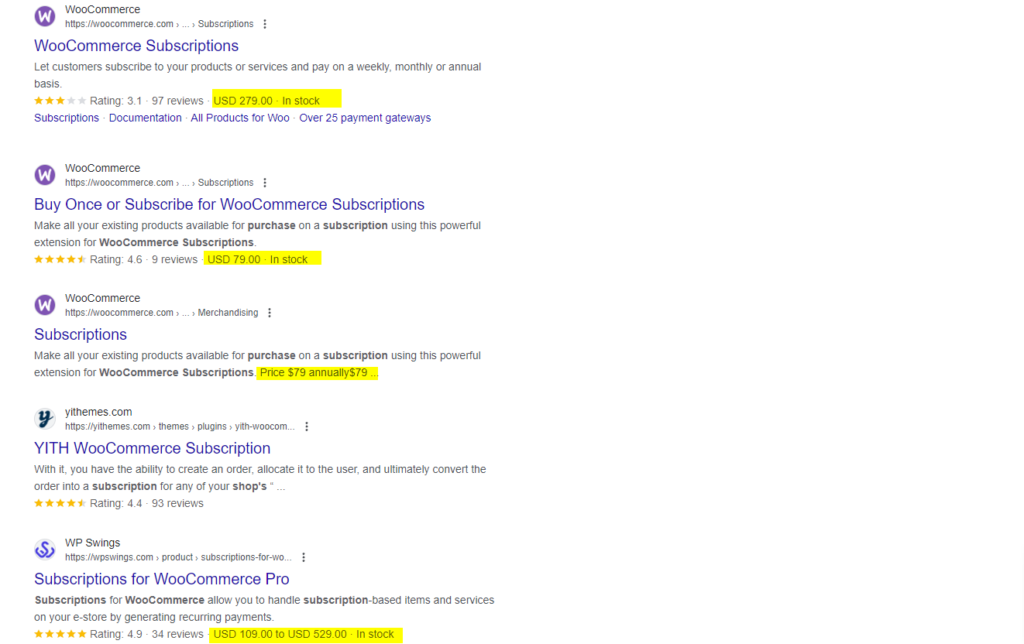
Before you start, it’s wise to use a child theme to make these changes. If you haven’t set one up yet, you can quickly do so using our free WordPress child theme generator to protect your modifications.
Step 1: Removing Price & Stock Information from WooCommerce Structured Data
Google often uses structured data (also known as schema markup) to gather detailed information like price and stock status from product pages. We can modify this data to exclude price and stock information before it reaches search engines.
Add the following code to your theme’s functions.php file:
/*
 * Snippet: How to Hide WooCommerce Product Price & Stock From Google – 2026
 * Author: John Cook
 * URL: https://wcsuccessacademy.com/?p=1460
 * Tested with WooCommerce 10.7.0
 * "Remove price and stock information from WooCommerce structured data"
*/
function wcsuccess_remove_price_stock_from_structured_data($data, $product, $context) {
    if (isset($data['offers'])) {
        unset($data['offers']['price']);
        unset($data['offers']['priceValidUntil']);
        unset($data['offers']['availability']);
        unset($data['offers']['inventoryLevel']);
    }
    return $data;
}
add_filter('woocommerce_structured_data_product', 'wcsuccess_remove_price_stock_from_structured_data', 10, 3);
This function intercepts WooCommerce’s structured data before it is output to the page, removing entries related to price and stock levels. This prevents these details from being used in Google’s rich snippets.
Step 2: Filtering WooCommerce REST API Responses
If your WooCommerce site is accessed through external applications using the REST API, you might also want to hide price and stock data from these outputs. Here’s how you can filter API responses:
/*
 * Snippet: How to Hide WooCommerce Product Price & Stock From Google – 2026
 * Author: John Cook
 * URL: https://wcsuccessacademy.com/?p=1460
 * Tested with WooCommerce 10.7.0
 * "Filter out price and stock from WooCommerce API responses"
*/
function wcsuccess_filter_api_response($response, $object, $request) {
    if (isset($response->data['price'])) {
        unset($response->data['price']);
        unset($response->data['regular_price']);
        unset($response->data['sale_price']);
        unset($response->data['stock_status']);
        unset($response->data['stock_quantity']);
    }
    return $response;
}
add_filter('woocommerce_rest_prepare_product_object', 'wcsuccess_filter_api_response', 10, 3);
This code adjusts the REST API output, removing price and stock information from the product data that might otherwise be accessible publicly.
Conclusion
By using these methods, you can control the visibility of sensitive data such as product prices and stock levels on your WooCommerce site, ensuring that this information doesn’t appear in Google’s search results or snippets. This is particularly beneficial for stores with variable pricing or those who wish to keep their inventory private.
Make sure you implement these changes in a child theme to prevent updates from overriding your custom code. If you need to set up a child theme, our free WordPress child theme generator can assist you quickly and easily.
As always, remember that managing how your site interacts with search engines and external applications is crucial for maintaining your business’s operational privacy and strategic advantage.

I have been working with WordPress and WooCommerce since 2012 and have developed a deep knowledge of the content management system. Since 2012, I have developed several plugins and designed dozens of websites utilising different frameworks, CMS’s and programming languages. I am proficient in PHP, Python, Java, C, C++, R and JavaScript with limited experience in Go, Kotlin and Swift.
Educationally, I have a Master’s degree in cyber security a Bachelor’s (Hons, First Class) in Applied Research and a Graduate Certificate in Data Science. I’m currently undertaking PhD studies investigating IoT cybersecurity. I recently graduated with First Class Honours and Masters of Information Technology, receiving the Executive Dean’s Award for studies undertaken in the 2021 and 2022 academic years. I have worked in the information technology industry for the past 11 years primarily as a software/web developer specific to design, optimisation, network management and security. My research interests are in the areas of Internet of Things (IoT), 5G and Beyond Networks, information security for wireless networks and software development.
Stay In Touch
